Introduction
Report generation is a basic requirement for many web applications. When it comes to report generation in Python, we developers usually rely on libraries like WeasyPrint or Puppeteer. These libraries are either slow or use a lot of memory and CPU, which makes them less suitable for generating reports at scale.
This is where Typst provides a compelling alternative.
What is Typst?
Typst is a typesetting system that aims to offer a better, faster and simpler alternative to LaTeX. Its syntax is simple, compile time is lower than LaTeX making it a very good choice for report generation.
Typst is built with Rust, making it blazingly fast 🚀 ™️ at rendering PDFs.
Benchmark Setup and Results
All benchmarks were executed on the same machine.The system configuration used for testing is shown below.
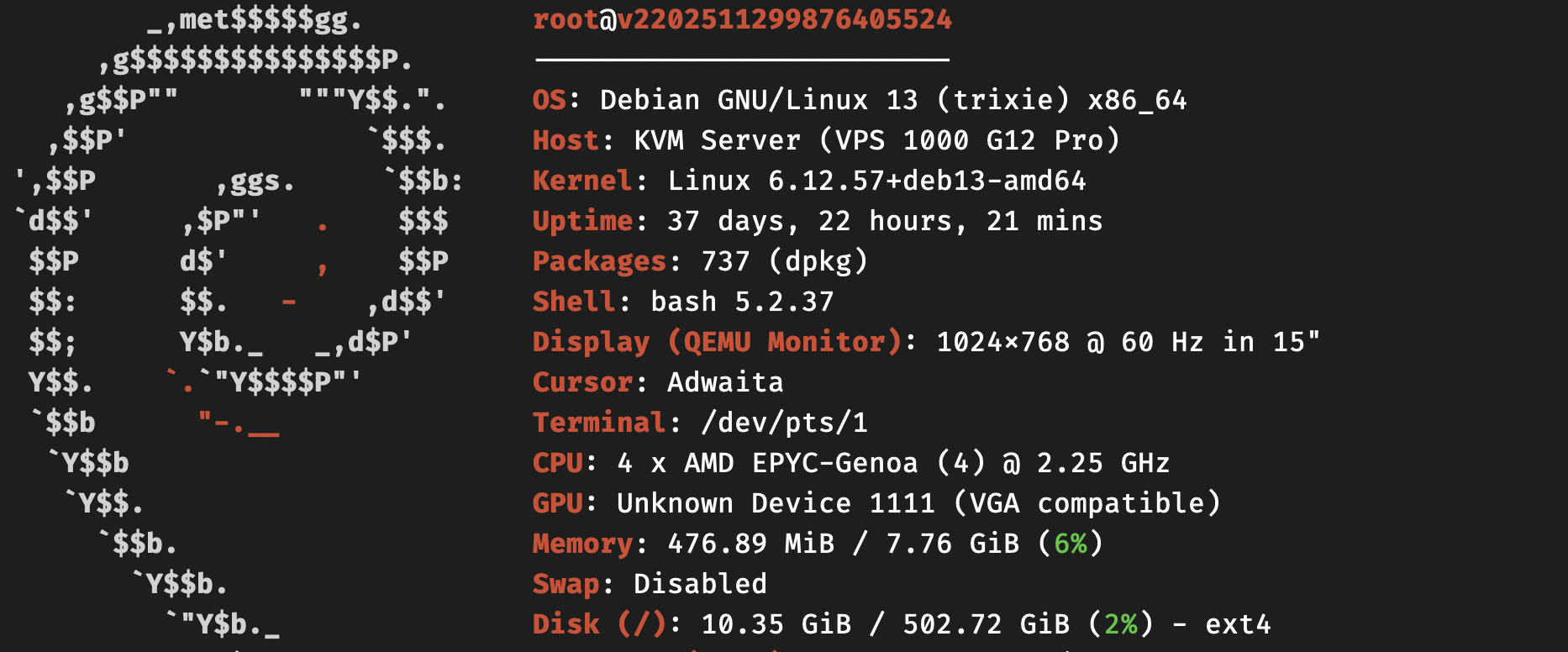
I ran a benchmark comparing WeasyPrint, Playwright, and Typst by generating PDFs from a tabular dataset with the following columns: id, name, date of birth, and phone number. The dataset was randomized using the Faker library.
Each tool was tested with 100, 1,000, and 10,000 rows to evaluate how performance scales with increasing data size.
The complete benchmark code is available on GitHub:https://github.com/swastikgn/dev-code/tree/main/typst-report
100 Records
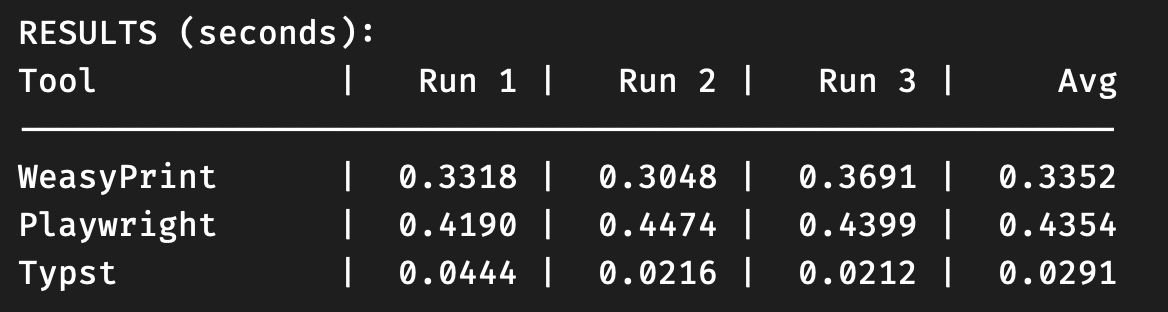
The following benchmark shows the time taken to generate a PDF containing 100 records using WeasyPrint, Playwright, and Typst.
1,000 Records
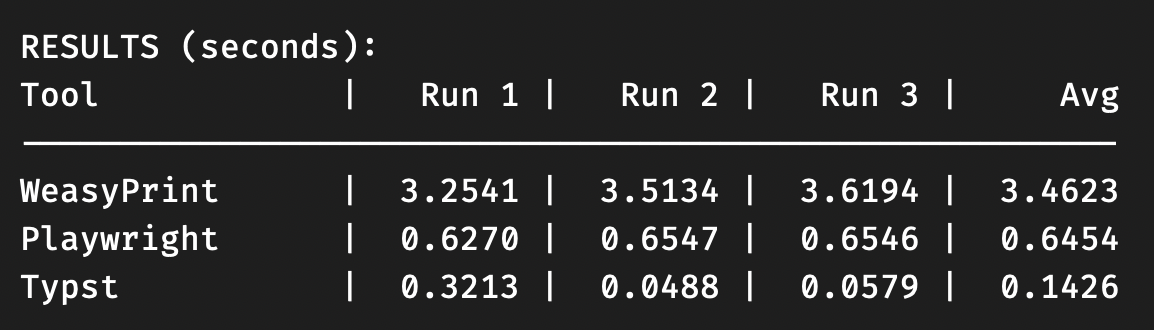
The following benchmark shows the time taken to generate a PDF containing 1,000 records using WeasyPrint, Playwright, and Typst.
10,000 Records
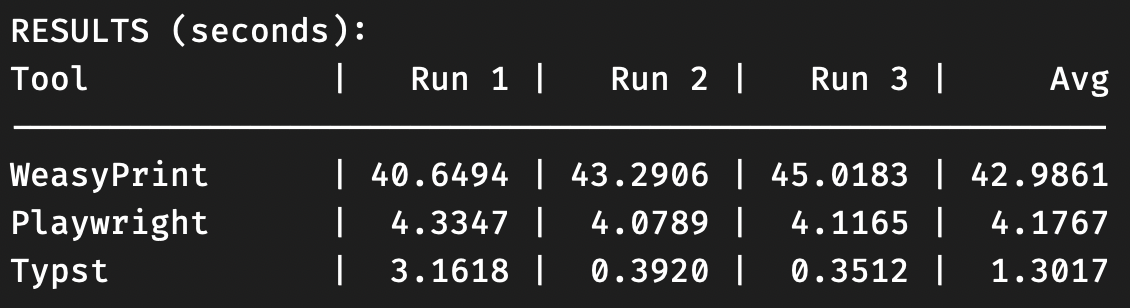
The following benchmark shows the time taken to generate a PDF containing 10,000 records using WeasyPrint, Playwright, and Typst.
Observations
Typst consistently renders PDFs faster across different dataset sizes, and the performance gap widens as the number of records increases.
Getting Started with Typst
Now that you’ve seen why Typst is worth considering, let’s go through the basics so you can start creating your own reports.
Since we’ll be using the uv package manager, let’s start by creating a new project:
uv init typst-exampleThis creates a basic project structure to get us started.
Next, cd into the directory and install typst and faker library.
cd typst-example
uv add typst faker
This will create a virtual environment and add the typst and faker as dependency to the project.
Inside the project directory, create a file named template.typ.
touch template.typThis file will contain the Typst template used to generate the PDF.
Next, add the following code to main.py:
import json
import typst
from faker import Faker

faker = Faker("en_IN")

persons = [
    {
        "name": faker.name(),
        "email": faker.email(),
        "phone_number": faker.phone_number(),
        "aadhar_id": faker.aadhaar_id(),
        "address": faker.address(),
    }
    for i in range(300)
]

sys_inputs = {"data": json.dumps(persons)}

typst.compile(input="template.typ", output="output_pdf.pdf", sys_inputs=sys_inputs)
This script generates sample user data using Faker and prepares it for document rendering. The data is passed to a Typst template as JSON using system inputs. Typst then compiles the template into a final PDF file containing the generated records.
Next, update the template.typ file with the following content:
#set page(
  margin: (x: 1cm, y: 1cm),
  footer: context [
    #set align(center)
    #set text(size: 10pt)
    Page #counter(page).display() | #datetime.today().display()
  ]
)
= Users List
#let persons = json(bytes(sys.inputs.data))
#set table(
  stroke: 0.5pt,
  inset: (x: 6pt, y: 4pt),
)
#table(
  columns: (0.5fr, 2fr, 3fr, 1.6fr, 1.8fr),
  table.header(
    align(center)[*ID*],
    align(center)[*Name*],
    align(center)[*Email*],
    align(center)[*Phone*],
    align(center)[*Aadhaar ID*],
  ),
  ..for (index, person) in persons.enumerate() {
    (
      [#box(width: 100%, align(center)[#(index + 1)])],
      [#person.name],
      [#person.email],
      [#box(width: 100%, align(center)[#person.phone_number])],
      [#box(width: 100%, align(center)[#person.aadhar_id])],
    )
  }
)
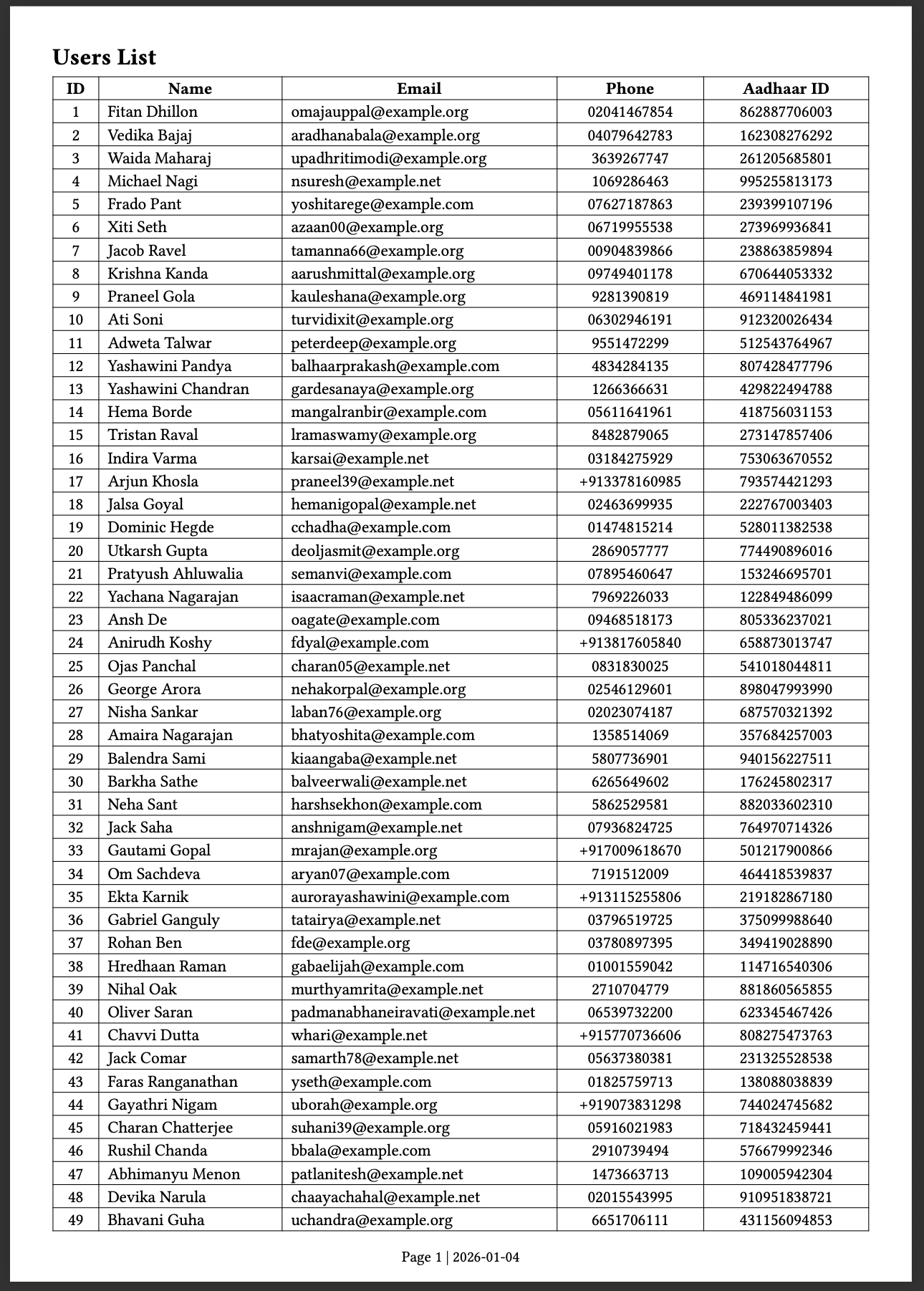
This template defines the overall layout and structure of the generated PDF. It sets page margins and adds a footer that displays the page number along with the current date. The template reads the user data passed from main.py via system inputs and applies global table styling for consistent borders and spacing. Finally, it renders a table with predefined headers and dynamically populates each row with user details, automatically numbering the entries starting from one.
Below is the generated PDF output using this template.
Drawbacks
At the time of writing, the latest Typst version is 0.14.2, which means the project is still under active development. While this brings rapid improvements, it also implies potential breaking changes and evolving APIs.
One practical issue I encountered is with table rendering: long text does not always stay within table cell boundaries and can overflow unless manually broken (for example, using regex-based preprocessing).
Despite these limitations, Typst already performs well enough to be a strong and efficient choice for large-scale report generation.